- Download necessary file from XDA forum (root.zip).
- Original guide from XDA Forum.
- Transfer root.zip to external card (memory card).
- Some use Kies to transfer the file, I just use Wifi File Transfer, easier :D
- Power off the phone.
- Enter recovery mode (Volume Up + Power Button).
- Select install update from external storage.
- Select root.zip and press power button. Wait for the update to finish.
- Select reboot now. If you are connected to the internet, Superuser will auto update.
Showing posts with label tab. Show all posts
Showing posts with label tab. Show all posts
Tuesday, July 10, 2012

Tuesday, May 22, 2012
Configure Portable Hotspot in Galaxy Tab P1000
- Goto Menu > Settings
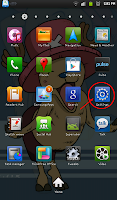
- Goto Wireless and network
.png)
- Goto Tethering and portable hotspot
.png)
- Goto Portable Wi-Fi hotspot settings
.png)
- Goto Configure portable Wi-Fi hotspot
- Network ssid = your network name (your identifier when you want to connect to it).
- Security = type of security, prefer WPA2 PSK.
- Password = this is your network password when you want to connect to it.
.png)
.png)
- Choose Save.
- Tick/select Portable Wi-Fi hotspot to enable/start using it.
- Don't forget to enable data network.

- Goto Wireless and network
.png)
- Goto Tethering and portable hotspot
.png)
- Goto Portable Wi-Fi hotspot settings
.png)
- Goto Configure portable Wi-Fi hotspot
- Network ssid = your network name (your identifier when you want to connect to it).
- Security = type of security, prefer WPA2 PSK.
- Password = this is your network password when you want to connect to it.
.png)
.png)
- Choose Save.
- Tick/select Portable Wi-Fi hotspot to enable/start using it.
- Don't forget to enable data network.
Check Lock (Network, Subset, SP, CP) Samsung Android
*#7465625#Type in the code at your phone Dialer and then you will see something like this. (Tested on Galaxy Tab P1000).

Thursday, May 17, 2012
Android: Set Static IP (Galaxy Tab P1000)
- Go to Settings > Wireless and network > Wi-Fi Settings.
- Click hardware button 'menu', choose Advanced.
- Select 'Use static IP'.
- Set the IP address, gateway, netmask, DNS1 and DNS2.


- Click hardware button 'menu', choose Advanced.
- Select 'Use static IP'.
- Set the IP address, gateway, netmask, DNS1 and DNS2.


Guide from AndroidForums.com.
Tuesday, November 15, 2011
My Favourite Virtual Guitar On Galaxy Tab
1. Solo
Android Market: Solo Lite
Mediafire
Pass: simple
2. Robotic Guitarist
Android Market: Robotic Guitarist Free
Mediafire
Pass: simple


Android Market: Solo Lite
Mediafire
Pass: simple
2. Robotic Guitarist
Android Market: Robotic Guitarist Free
Mediafire
Pass: simple


Sort Menu On Galaxy Tab
Before this, I manually arranged the application's menu. Now, you can do this automatically using AppZorter Lite (search in Market).


Monday, November 14, 2011
Unable To Root Your Galaxy Tab?
I have tried many app and software to root my Samsung Galaxy Tab. My previous phone Sony Ericsson Xperia x10 mini pro is really easy. I have tried z4root, Gingerbreak, SuperOneClick and Universal Androot but to no avail.
 At last i have found the solution. Easy and fast.
Summary from the tutorial.
- Using Odin3 v1.7
- Using CF-Root-TAB7_XX_OXA_JQ1-v3.3-CWM3RFS
Complete tutorial here. Thanks!
Files here. Thanks!

Summary from the tutorial.
- Using Odin3 v1.7
- Using CF-Root-TAB7_XX_OXA_JQ1-v3.3-CWM3RFS
Complete tutorial here. Thanks!
Files here. Thanks!
Subscribe to:
Posts (Atom)