- I got this from Basic4PPC.Com.
- Just go to Settings > More > About Device, then click on it 7 times.
- Try it yourself!
Showing posts with label android. Show all posts
Showing posts with label android. Show all posts
Thursday, September 4, 2014

Sunday, September 15, 2013
View .vnt File (From Android Memo) On PC
- I transfer memo from android to windows, I thought I go a .txt (text document) file, instead I got a .vnt file.
- Googling and found this site (android forum).
- I use this site for decode the .vnt file to text document.
- "You can use this script to decode a source quotedprintable text and directly show a decoded text, or convert the source file encoded by quotedprintable directly to the source text or a binary data (select a source file using the file field in this form, check export to a binary file)."
- Have a try :-)
- Googling and found this site (android forum).
- I use this site for decode the .vnt file to text document.
- "You can use this script to decode a source quotedprintable text and directly show a decoded text, or convert the source file encoded by quotedprintable directly to the source text or a binary data (select a source file using the file field in this form, check export to a binary file)."
- Have a try :-)
Wednesday, September 11, 2013
Get Active GPS NMEA Output From Android To Windows
- I use ExpertGPS (on Windows) and Bluetooth GPS Output (on Android).

- First you must pair bluetooth device between your PC and Android phone/tablet. I am using Galaxy Tab P1000.

- Then you must enable serial connection (COM port) over bluetooth on PC.

- Enable NMEA tracking on ExpertGPS, select the right port number based on your bluetooth device properties.

- Have a try :-)


- First you must pair bluetooth device between your PC and Android phone/tablet. I am using Galaxy Tab P1000.

- Then you must enable serial connection (COM port) over bluetooth on PC.

- Enable NMEA tracking on ExpertGPS, select the right port number based on your bluetooth device properties.

- Have a try :-)


Saturday, February 2, 2013
Alternative Wireless Keyboard and Mouse Using Android
- I got a problem with my keyboard, keys are starting to not functioning one by one.
- Googling for keyboard using Android mobile phone, and have found RemoteDroid.
- Just download the server to PC, and install app (client) on Android phone.
- Learn here more about it at Play Store and RemoteDroid website.
- Googling for keyboard using Android mobile phone, and have found RemoteDroid.
- Just download the server to PC, and install app (client) on Android phone.
- Learn here more about it at Play Store and RemoteDroid website.
Monday, September 3, 2012
One Way To Identify Who Have Stolen Your Android
- I came across an article from Stomp regarding stolen iPhone.
- What makes me interested is, how the owner locate and identify the thief using a software for iPhone.
- And the good news is, yes, there's also similar software for Android phone too, but for Gingerbread (2.3) and up (recommended).
 - You can get it from Play Store here.
- What makes me interested is, how the owner locate and identify the thief using a software for iPhone.
- And the good news is, yes, there's also similar software for Android phone too, but for Gingerbread (2.3) and up (recommended).
Friday, August 10, 2012
How To Sync Your Android Clock/Time
- I received a comment asking how to sync android tablet/phone clock@time.
- I found this ClockSync @ Play Store. You can download the app using your android.
- There's a problem with Sirim time server, so you can use 'my.pool.ntp.org'.


 - Your android need to have ROOT access for this app to work (auto mode), but there's also assisted manual mode (rootless).
- I found this ClockSync @ Play Store. You can download the app using your android.
- There's a problem with Sirim time server, so you can use 'my.pool.ntp.org'.


Wednesday, June 27, 2012
How To Hack Guns N Glory (Coin, Cash) - Android

Thursday, June 7, 2012
How To Sign APK
Downloaded APK sometimes got a problem to install, like "application not installed". There are 2 problems related to this:-


1. You need to uninstall the installed app first, means that you can't upgrade/update over existing.
2. Problem with cert/sign.


1. Copy the apk that you want to sign to "place-apk-here-for-signing".
2. Run "script.bat".
3. Choose 16 @ type "16" and Enter. Wait until the process finished, then you can copy back the apk to your device and install.
Wednesday, June 6, 2012
Netcut Test With Android App
I have tested some protection apps against netcut, and currently, non is working to defend/protect against netcut.

1. DroidSheep Guard (GPlay)
DroidSheep Guard protects your phone from DroidSheep, Faceniff & other hijackers. - Not working against netcut.
2. Wifi Protector (GPlay)
Detects and protects from all kinds of ARP (Address Resolution Protocol) related attacks in Wi-Fi networks, like DOS (Denial Of Service) or MITM (Man In The Middle). - Not working against netcut.
3. SharpWatcher (GPlay)
Prevent faceniff and droidsheep ( ARP Spoof ) attaks on your device without any effort, just turn on shARPWatcher and let it do the rest for you! - Not working against netcut.
For record, my phone is rooted.

1. DroidSheep Guard (GPlay)
DroidSheep Guard protects your phone from DroidSheep, Faceniff & other hijackers. - Not working against netcut.
2. Wifi Protector (GPlay)
Detects and protects from all kinds of ARP (Address Resolution Protocol) related attacks in Wi-Fi networks, like DOS (Denial Of Service) or MITM (Man In The Middle). - Not working against netcut.
3. SharpWatcher (GPlay)
Prevent faceniff and droidsheep ( ARP Spoof ) attaks on your device without any effort, just turn on shARPWatcher and let it do the rest for you! - Not working against netcut.
For record, my phone is rooted.
Wednesday, May 30, 2012


Wednesday, May 23, 2012
Create App For Android Using Basic4Android
I have found something interesting for basic language developer, now you can create app for Android.


You can get it here (trial version). There's 2 things you need to have to use it, Java SE development kit and Android SDK.


Tuesday, May 22, 2012
Configure Portable Hotspot in Galaxy Tab P1000
- Goto Menu > Settings
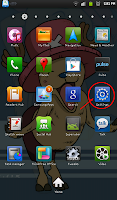
- Goto Wireless and network

- Goto Tethering and portable hotspot

- Goto Portable Wi-Fi hotspot settings

- Goto Configure portable Wi-Fi hotspot
- Network ssid = your network name (your identifier when you want to connect to it).
- Security = type of security, prefer WPA2 PSK.
- Password = this is your network password when you want to connect to it.


- Choose Save.
- Tick/select Portable Wi-Fi hotspot to enable/start using it.
- Don't forget to enable data network.

- Goto Wireless and network

- Goto Tethering and portable hotspot

- Goto Portable Wi-Fi hotspot settings

- Goto Configure portable Wi-Fi hotspot
- Network ssid = your network name (your identifier when you want to connect to it).
- Security = type of security, prefer WPA2 PSK.
- Password = this is your network password when you want to connect to it.


- Choose Save.
- Tick/select Portable Wi-Fi hotspot to enable/start using it.
- Don't forget to enable data network.
Check Lock (Network, Subset, SP, CP) Samsung Android
*#7465625#Type in the code at your phone Dialer and then you will see something like this. (Tested on Galaxy Tab P1000).

Sunday, May 20, 2012
Free Call using Android

Using File Expert (Android) Wifi File Receiver
I have installed File Expert on my Android device. The interface is not so complicated and user-friendly, and I can understand how to use it easily on the first trial. But I got confuse with Wifi File Receiver. What is it for? So I googled it and found the anwer. It is use to send file through wifi to other phone in the same wifi network. I thought its use to send file from PC to phone. Here's a description from their website.


Thursday, May 17, 2012
Android: Set Static IP (Galaxy Tab P1000)
- Go to Settings > Wireless and network > Wi-Fi Settings.
- Click hardware button 'menu', choose Advanced.
- Select 'Use static IP'.
- Set the IP address, gateway, netmask, DNS1 and DNS2.


- Click hardware button 'menu', choose Advanced.
- Select 'Use static IP'.
- Set the IP address, gateway, netmask, DNS1 and DNS2.


Guide from AndroidForums.com.
Saturday, December 3, 2011
Skitch Alternative?

I really love Skitch for Android! At this moment, I can't find any other software for Windows or app for Android that Skitch can do. I love the way Skitch smooth the line that I draw using finger on my Galaxy Tab. Other paint/sketch/draw apps can't do that. EXCEPT, I can't colour/paint using Skitch!
Hope next time Evernote Corp can improve/add that feature. 'Sigh...
(Or maybe anyone know app/software alternative to Skitch?)

 |
| This is why I love Skitch for Android. It will smooth the line you draw. Other app that I found can't do this! Please consider this function when you develop a paint/sketch app. :-p |
20/12/2011 Update:-
I have just found an alternative to drawing like Skitch for Windows, also available for Mac OS Xand Linux. Inkscape, a vector graphic editor. Get it for free!
Here's how you want to draw like Skitch in Windows (as I am using Windows 7).
 |
| 1. Open Inkscape. 2. Select Draw freehand lines. 3. Adjust smoothing, recommend 48+. |
Subscribe to:
Posts (Atom)