- Somehow two of my PC and laptop cannot boot after installed Windows Update, somewhat related to 1803 version.
- First my PC got boot corrupted.
- So I burn Windows 10 ISO to USB, boot from USB, select REPAIR > TROUBLESHOOT > COMMAND PROMPT.
- I have multiple HDD and Windows on my PC.
- And I found out that, after installed updates related to 1803, boot sector/configuration is corrupted, the main Windows folder that I use is not in the boot list anymore.
- So the boot list is corrupted.
- First, I identify which volume is my Windows folder using DISKPART and make it active.
- You can google "windows 10 bootmgr missing", "windows 10 bcdboot repair", "windows 10 bootrec fixboot" and so on.
- Using DISKPART, I use LIST DISK, LIST PARTITION, LIST VOLUME, SELECT VOLUME, ACTIVE then EXIT.
- My missing Windows folder is D:\Windows.
- I try using BOOTREC /FIXMBR, then BOOTREC /FIXBOOT, but FIXBOOT give me error message either "ELEMENT NOT FOUND" or "ACCESS DENIED".
- So I go to folder "D:\EFI\MICROSOFT\BOOT", rename the current BCD to remove it using "REN BCD BCD.BAK".
- Then I use "BCDBOOT D:\Windows \l en-us \ s d: \f ALL"
- Then I use "BOOTREC /SCANOS", then "BOOTREC /REBUILDBCD"
- Then I restart my computer.
- Make sure first boot HDD is the HDD that you want to load the Windows.
- So because I don't want anymore Windows Update on Windows 10, I googled and found article on "How to Disable Windows 10 Update in Every Way" from EaseUS (https://www.easeus.com/todo-backup-resource/how-to-stop-windows-10-from-automatically-update.html#part1)
- I use "SERVICES.MSC" > Windows Update > Disabled.
- Then I use "GPEDIT.MSC" > Computer Configuration > Administrative Templates > Windows Components > Windows Update > Configure Automatic Updates > Disabled.
Showing posts with label configure. Show all posts
Showing posts with label configure. Show all posts
Friday, September 28, 2018

Friday, September 14, 2012
(Solved) Windows setup could not configure windows to run on this computer's hardware
- I got this error when I try to install Windows 7 from usb pendrive.
- Info from microsoft support site said that it is caused by advanced format drive @ RAID. You can find the solution there, and here's the link to RAID driver download from Intel (optional).
- But that's not the solution for my problem as my hdd already set to IDE.
- Here's how. If you create the usb instalation disk using YUMI, then you need to unplug the usb before the first reboot (take note; BEFORE THE FIRST REBOOT). More info here. This solve my problem.
- Info from microsoft support site said that it is caused by advanced format drive @ RAID. You can find the solution there, and here's the link to RAID driver download from Intel (optional).
- But that's not the solution for my problem as my hdd already set to IDE.
- Here's how. If you create the usb instalation disk using YUMI, then you need to unplug the usb before the first reboot (take note; BEFORE THE FIRST REBOOT). More info here. This solve my problem.
Tuesday, May 22, 2012
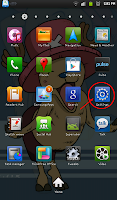
Configure Portable Hotspot in Galaxy Tab P1000
- Goto Menu > Settings
- Goto Wireless and network
.png)
- Goto Tethering and portable hotspot
.png)
- Goto Portable Wi-Fi hotspot settings
.png)
- Goto Configure portable Wi-Fi hotspot
- Network ssid = your network name (your identifier when you want to connect to it).
- Security = type of security, prefer WPA2 PSK.
- Password = this is your network password when you want to connect to it.
.png)
.png)
- Choose Save.
- Tick/select Portable Wi-Fi hotspot to enable/start using it.
- Don't forget to enable data network.

- Goto Wireless and network
.png)
- Goto Tethering and portable hotspot
.png)
- Goto Portable Wi-Fi hotspot settings
.png)
- Goto Configure portable Wi-Fi hotspot
- Network ssid = your network name (your identifier when you want to connect to it).
- Security = type of security, prefer WPA2 PSK.
- Password = this is your network password when you want to connect to it.
.png)
.png)
- Choose Save.
- Tick/select Portable Wi-Fi hotspot to enable/start using it.
- Don't forget to enable data network.
Subscribe to:
Posts (Atom)