1. My friend gave me a locked Google Account phone, Samsung J2 Prime. It need to login with Google Account of before the factory reset.
2. So as usual, thanks to Google.
3. The key in is being able to open internet browser on the phone. First guide taugh to use SideSync, second guide taugh to use TalkBack.
4. So I try using the TalkBack method to be able to open an internet browser, download APK, install, login new Google Account, and then restart, then login using the new Google Account again, then done!
5. The step by step video tutorial is in this link (https://www.youtube.com/watch?v=qHhdL7j16_w).
6. The APK file can be downloaded from (http://frps2018.blogspot.com/2018/01/frp-google-accoun-samsung-2018.html)
7. Take note that you need to follow the tutorial closely as if you skipped one of it, you cannot open the internet browser as it will be blocked for security reasons.
8. But if somehow when you manage to go to Settings, you can also open the internet browser at the "USER MANUAL" menu.
9. Backup APK can be download here and here (you need to downlad both files), install the google account manager APK first, then the FRP Bypass APK, and open/run the FRP Bypass app.
Showing posts with label samsung. Show all posts
Showing posts with label samsung. Show all posts
Wednesday, July 18, 2018

Thursday, October 9, 2014
How To Root - Samsung Galaxy Trend S7560
- Download Root Genius 1.8.7.
- Enable USB Debugging.
- Ensure that screen is not locked.
- Run Root Genius as administrator. Click Root. Wait.
- If status still not root, click Root again.
- If KingUser is installed but still have problem with root permission, then root again using Root Genius. I myself have to root up to 4 times for the root permission to work.
- Enable USB Debugging.
- Ensure that screen is not locked.
- Run Root Genius as administrator. Click Root. Wait.
- If status still not root, click Root again.
- If KingUser is installed but still have problem with root permission, then root again using Root Genius. I myself have to root up to 4 times for the root permission to work.
Install Stock ROM - Galaxy Trend S7560


- Power off.
- Enter Download Mode (Home + Volume Down + Power).
- Press Volume Up.


- Click BL, select .md5, click Start. Wait until finished.
- Done.
Recovery Mode - Samsung Trend S7560
- Power off.
- Press Home + Volume Up + Volume Down + Power button.
- When device power on, release power button but keep pressing Home + Volume Up + Volume Down.

- Press Home + Volume Up + Volume Down + Power button.
- When device power on, release power button but keep pressing Home + Volume Up + Volume Down.
Thursday, September 6, 2012
How To Reset Samsung C3303i (Champ)
- I try to use Settings > Reset > Master Reset, but it requires Phone Password which I don't know/have.
- I've done my Google Search, keyword 'samsung reset code', 'samsung default phone password', 'how to reset samsung champ', 'c3303i reset', 'e2p full reset'.
- Here's how. Goto keypad and type *2767*3855# and wait until phone reboot. Full reset done!
- More info from this site.
- I've done my Google Search, keyword 'samsung reset code', 'samsung default phone password', 'how to reset samsung champ', 'c3303i reset', 'e2p full reset'.
- Here's how. Goto keypad and type *2767*3855# and wait until phone reboot. Full reset done!
- More info from this site.
Friday, August 24, 2012
How To Reset Samsung Galaxy Mini 2 S6500
- I used pattern lock, then someone tried to break it, then it locked and I need to sign in using Google account.
- The worse thing is, I forgot the Google account that I use with it.
- Done a few search using Google, related keyword 'how to unlock pattern lock android', 'galaxy mini pattern lock', 'how to reset galaxy mini 2', 'how to reset samsung s6500'.
- Found this site, said to reset Galaxy Mini 2 by power off the phone, press VOLUME DOWN + HOME + POWER, not working.
- Found this info from XDA, related to recovery menu. I try VOLUME UP + VOLUME DOWN + HOME + POWER. Working, boot into recovery mode.
- Select wipe data/factory reset. Working.
- Note: From the XDA site, it said to press VOLUME UP + HOME + POWER to enter recovery mode, I think that is the right combination key.
- The worse thing is, I forgot the Google account that I use with it.
- Done a few search using Google, related keyword 'how to unlock pattern lock android', 'galaxy mini pattern lock', 'how to reset galaxy mini 2', 'how to reset samsung s6500'.
- Found this site, said to reset Galaxy Mini 2 by power off the phone, press VOLUME DOWN + HOME + POWER, not working.
- Found this info from XDA, related to recovery menu. I try VOLUME UP + VOLUME DOWN + HOME + POWER. Working, boot into recovery mode.
- Select wipe data/factory reset. Working.
- Note: From the XDA site, it said to press VOLUME UP + HOME + POWER to enter recovery mode, I think that is the right combination key.
Tuesday, May 22, 2012
Configure Portable Hotspot in Galaxy Tab P1000
- Goto Menu > Settings
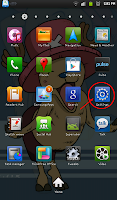
- Goto Wireless and network
.png)
- Goto Tethering and portable hotspot
.png)
- Goto Portable Wi-Fi hotspot settings
.png)
- Goto Configure portable Wi-Fi hotspot
- Network ssid = your network name (your identifier when you want to connect to it).
- Security = type of security, prefer WPA2 PSK.
- Password = this is your network password when you want to connect to it.
.png)
.png)
- Choose Save.
- Tick/select Portable Wi-Fi hotspot to enable/start using it.
- Don't forget to enable data network.

- Goto Wireless and network
.png)
- Goto Tethering and portable hotspot
.png)
- Goto Portable Wi-Fi hotspot settings
.png)
- Goto Configure portable Wi-Fi hotspot
- Network ssid = your network name (your identifier when you want to connect to it).
- Security = type of security, prefer WPA2 PSK.
- Password = this is your network password when you want to connect to it.
.png)
.png)
- Choose Save.
- Tick/select Portable Wi-Fi hotspot to enable/start using it.
- Don't forget to enable data network.
Check Lock (Network, Subset, SP, CP) Samsung Android
*#7465625#Type in the code at your phone Dialer and then you will see something like this. (Tested on Galaxy Tab P1000).

Monday, November 14, 2011
Unable To Root Your Galaxy Tab?
I have tried many app and software to root my Samsung Galaxy Tab. My previous phone Sony Ericsson Xperia x10 mini pro is really easy. I have tried z4root, Gingerbreak, SuperOneClick and Universal Androot but to no avail.
 At last i have found the solution. Easy and fast.
Summary from the tutorial.
- Using Odin3 v1.7
- Using CF-Root-TAB7_XX_OXA_JQ1-v3.3-CWM3RFS
Complete tutorial here. Thanks!
Files here. Thanks!

Summary from the tutorial.
- Using Odin3 v1.7
- Using CF-Root-TAB7_XX_OXA_JQ1-v3.3-CWM3RFS
Complete tutorial here. Thanks!
Files here. Thanks!
Subscribe to:
Posts (Atom)